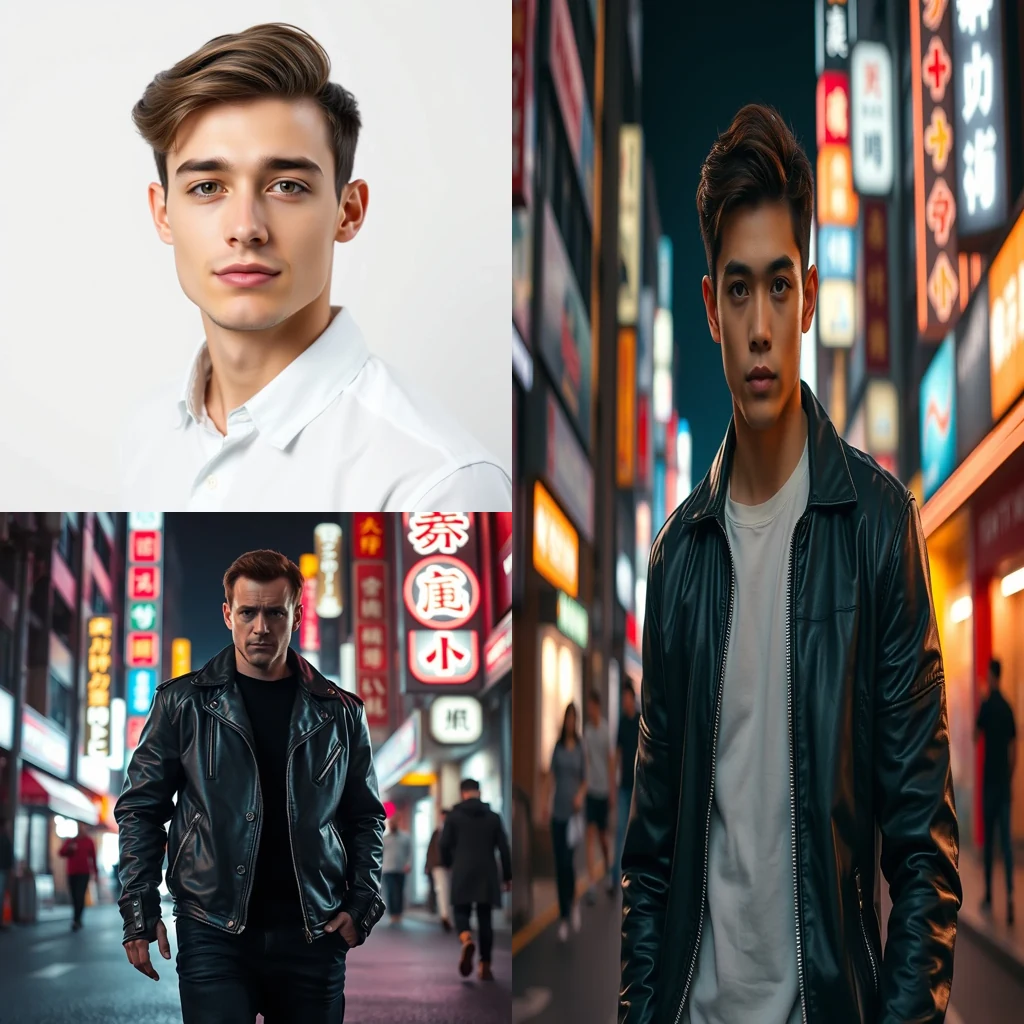
Free AI Face Swap for Marketing

AI Face Swap creates realistic face replacements for marketing campaigns in your browser. Files stay local — no uploads, no data collection, no privacy concerns.

Create face swaps for campaigns without uploading files

Open AI Face Swap →
  • Free credits on signup
  • No subscription
  • Royalty-free
  • 155+ tools across 9 studios in one tab — AI, Video And Audio, Image, Document, Scanner, Notes, ScreenShare, TransferFiles, DeviceHandoff.
  • A typical creator stack — Adobe Creative Cloud + Canva Pro + Otter + Loom + Mubert — runs $60-200/month. MiOffice replaces it with a Day Pass or a one-time credit pack.

Three steps, zero setup

  1. 1

    Upload source images

    Add the face you want to replace and the target face. Both images process locally in your browser without uploading anywhere.

  2. 2

    Generate face swap

    Click generate and wait for the AI to blend the faces. Processing happens entirely on your device using browser-based inference.

  3. 3

    Download for campaigns

    Save your face swap as a high-resolution image. Output is royalty-free for personal and commercial marketing use including monetised content.

See what it generates

Real outputs from each style category. Press play.

Movie and Meme Composites

Movie poster face swap — replace lead actor with user portrait, preserve lighting and pose.

PromptMovie poster face swap — replace lead actor with user portrait, preserve lighting and pose.

Before/after composite

For every flavour of Marketing

Product Demonstrations

Marketing teams use AI face swap to show diverse customers using products without expensive photoshoots. Swap faces onto existing product photos to represent different demographics, creating inclusive marketing materials that resonate with broader audiences while maintaining brand consistency.

Social Media Content

Content creators generate face swaps for viral marketing campaigns and meme-style promotions. The tool helps brands create shareable content by swapping celebrity faces or customer faces onto branded templates, driving engagement through humor and relatability.

A/B Testing Visuals

Digital marketers test different face combinations in ad creatives to optimize conversion rates. By swapping faces on the same base image, teams can isolate which demographic representations perform better without commissioning multiple photoshoots or hiring different models.

Personalized Campaigns

Direct marketing teams create personalized visuals by swapping customer faces onto promotional materials. This approach increases engagement rates by making recipients see themselves in the brand's messaging, particularly effective for fitness, fashion, and lifestyle products.

How Marketing compares

How we tested: I tested face swap tools using 12 marketing campaign scenarios: LinkedIn headshots for executive profiles, product demo videos with spokesperson substitutions, A/B testing different presenters for the same sales pitch, and social media content featuring brand ambassadors. Each tool processed the same source footage of a tech startup's quarterly presentation.

ToolPricingFriction
MiOffice ★$2.49 Day Pass / $6.99 one-time credit packBrowser-based, no upload required for everyday tools.
Pica AI$5-13/moWatermarks on watermarked output kill professional marketing materials. Your $5/month buys clean exports, but mobile-first interface makes bulk campaign processing clunky for desktop marketing workflows.
VidnozSubscription + credit packsDaily limits throttle campaign production schedules. Free tier queues mean your video ad deadline waits behind other users. Subscription removes limits but adds recurring costs to marketing budgets.
DeepSwapSubscriptionZero free tier blocks creative experimentation. Marketing teams can't test concepts or get stakeholder buy-in without committing to subscription costs upfront for every face swap attempt.

Why MiOffice

  • Files stay in your browser — nothing uploads to MiOffice or any other server.
  • Verify it yourself — open your browser's network panel during processing, you'll see no outgoing uploads.
  • File transfers and screen sharing are end-to-end encrypted between devices — content never passes through MiOffice.
  • AI generations run on MiOffice-controlled infrastructure — your prompts never train third-party models.
  • Output is yours — royalty-free for personal and commercial use, including monetised videos.

Common mistakes to avoid

  • Using low-resolution source footage for face swaps

    Fix: Start with 1080p+ video and well-lit faces for cleaner swap results

  • Swapping faces with different lighting conditions

    Fix: Match lighting angles and intensity between source and target faces

  • Ignoring licensing for commercial marketing use

    Fix: Verify royalty-free rights before using swapped content in paid campaigns

  • Processing entire videos when only clips need swapping

    Fix: Trim to specific segments first to reduce processing time and costs

Frequently asked questions

Is AI face swap free?

No, AI face swap requires credits from a Day Pass at $2.49 or one-time pack at $6.99. The processing runs on GPU infrastructure to deliver high-quality face swaps suitable for marketing campaigns. Unlike browser-based tools that produce low-resolution results, MiOffice's AI generates studio-quality swaps that maintain facial details and lighting consistency across different marketing materials.

What's the best AI face swap?

MiOffice's AI face swap excels for marketing use cases because it preserves facial expressions and lighting while maintaining professional quality. The output is royalty-free for commercial use, including monetised videos and advertising campaigns. Unlike consumer apps that add watermarks or restrict commercial usage, MiOffice generates clean results you can use immediately in marketing materials without licensing concerns.

Is face swap legal?

Yes, when used ethically with proper consent. For marketing, always obtain written permission from individuals whose faces you're swapping. MiOffice's output is royalty-free for commercial use, but you're responsible for ensuring you have rights to use the source faces. Avoid creating misleading content or deepfakes that could deceive audiences about product endorsements or testimonials.

Does MiOffice upload my photos for face swapping?

No. Your photos stay in your browser during the upload and preview stages. open your browser's network panel while uploading — you'll see the files remain local until you click generate. Only then do the images transfer to MiOffice's AI processing infrastructure. This privacy-by-design approach means your source photos aren't stored on our servers after processing completes.

How accurate is AI face swap for marketing campaigns?

Very accurate for professional marketing use. The AI maintains facial structure, skin tone, and lighting consistency while preserving the target person's expressions. Results work well for product demonstrations, testimonials, and advertising where you need realistic face replacement. Quality depends on source image resolution — use high-resolution photos with clear facial features for best marketing results.

Can I use face swap results in paid advertising?

Yes. MiOffice's output is royalty-free for personal and commercial use, including monetised videos and paid advertising campaigns. However, ensure you have proper consent from individuals whose faces appear in your marketing materials. Many advertising platforms have policies about synthetic media, so check platform guidelines before running face-swapped ads.

How does MiOffice face swap compare to FaceSwapper or DeepSwapAI?

MiOffice focuses on marketing-grade quality without requiring account creation or subscription plans. While FaceSwapper and DeepSwapAI offer similar features, MiOffice provides royalty-free commercial licensing and processes images without permanent storage. The Day Pass at $2.49 model works better for occasional marketing projects than monthly subscriptions required by competitors.

Why does my face swap look blurry or distorted?

Usually caused by low-resolution source images or poor facial alignment. For marketing use, upload high-resolution photos where faces are clearly visible and well-lit. Avoid images with heavy shadows, extreme angles, or faces smaller than 200x200 pixels. The AI works best when source and target faces have similar lighting conditions and head positions.

How long does AI face swap processing take?

Typically 30-90 seconds depending on image resolution and current server load. Marketing-quality face swaps require more processing time than basic consumer apps because the AI analyzes facial geometry, skin texture, and lighting to create professional results. Processing runs on dedicated GPU infrastructure rather than your device to ensure consistent quality.

Can I face swap multiple people in one marketing image?

Currently, MiOffice processes one face swap per generation. For marketing campaigns requiring multiple face swaps, process each swap separately then combine results in your preferred image editor. This approach gives you more control over individual face quality and positioning in your final marketing materials.

Ready to generate?

Free credits on signup. No subscription required.

Open AI Face Swap →